


Making a presentation can take a lot of time. You need to plan the outline, write the content, choose the layout, fix the design, and make sure the whole deck is easy to present.
Dokie AI is built to make this process easier. It helps users turn ideas, notes, documents, or simple prompts into complete PPT drafts. Instead of starting from a blank slide, you can get a structured presentation first, then edit and polish it based on your real needs.
In this Dokie AI review, we will look at its main features, template categories, use cases, pros and cons, and whether it is worth trying.
What Is Dokie AI?
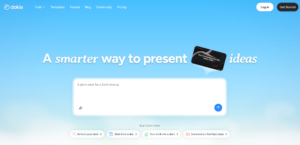
Dokie AI is an AI presentation maker that helps users create PPT slides with less manual work. You can use it to generate a presentation from a topic, prompt, document, or existing content.
The main value of Dokie AI is speed and structure. It does not only create slides. It helps organize your ideas into a clear presentation flow.
This is important because a good presentation is not just about looking nice. It also needs to answer the right questions in the right order. For example, a business report may need to show the background, key data, insights, problems, and next steps. A pitch deck may need to explain the problem, solution, market, product, business model, and team.
Dokie AI helps users build this kind of structure faster.
Key Features of Dokie AI
1. AI PPT Generation
The core feature of Dokie AI is AI-powered presentation generation. You can enter a topic or upload content, and Dokie AI can help turn it into a full slide deck.
This is helpful when you already know the topic but do not want to spend hours planning the deck manually.
For example, you can use Dokie AI to create:
- Weekly reports
- Monthly reports
- Marketing plans
- Pitch decks
- Training slides
- Class presentations
- Product updates
- Client proposals
- Strategy decks
- Research summaries
The generated deck gives you a first draft. You can then change the text, adjust the layout, add your own data, and polish the final version.
2. Ready-Made PPT Templates
Dokie AI also offers many PPT templates, which makes it easier to start from the right style and structure.
Templates are important because different presentations need different designs. A business report should feel professional and clear. A classroom lesson should be easy to follow. A pitch deck should tell a strong story. A medical presentation should look clean and trustworthy.
Dokie AI gives users different template categories so they can choose a better starting point for their deck.
The All category lets users browse the full template library and explore different styles.
The Business category is useful for company reports, strategy plans, project updates, client presentations, internal meetings, and performance reviews.
The Education category works well for teachers, students, trainers, and course creators who need lesson slides, class projects, workshops, or research presentations.
The Marketing category is a good fit for campaign reports, SEO summaries, influencer marketing plans, brand strategy decks, product launch plans, and growth presentations.
The Medical category is designed for healthcare education, medical reports, patient education materials, health awareness presentations, and medical training slides.
The Technology category is useful for SaaS decks, AI product introductions, technical reports, product roadmaps, software launch plans, and startup presentations.
The Pitch Deck category helps founders and business teams create investor decks, fundraising presentations, business proposals, and startup storylines.
The About Me category is useful for personal introductions, portfolios, resumes, creator profiles, student introductions, and personal branding decks.
The Infographics category helps users explain data, timelines, workflows, comparisons, processes, and research findings in a more visual way.
This template library makes Dokie AI more flexible. Users do not need to force one template style into every use case. They can start from a category that better matches the purpose of their presentation.
3. Business-Friendly Structure
Dokie AI is especially useful for business presentations because it focuses on clear structure.
In real work settings, a presentation usually needs to help people understand a topic quickly and make a decision. A good business deck should not only look polished. It should also have a clear flow.
Dokie AI can help create slides such as:
- Agenda
- Executive summary
- Background
- Key findings
- Data analysis
- Main challenges
- Recommendations
- Action plan
- Next steps
- Final summary
This makes it useful for weekly reports, monthly business reviews, strategy decks, project updates, and client presentations.
4. Free PPT Tools
Dokie AI also provides free PPT tools that help users turn different types of content into presentations.
These tools include:
- PDF to PPT
- Word to PPT
- Text to PPT
- Excel to PPT
- JPG to PPT
- PNG to PPT
- HTML to PPT
- DOC to PPT
This is useful because many presentations start from existing files. You may already have a PDF report, Word document, Excel sheet, text outline, image, or HTML page. Dokie AI’s free PPT tools can help convert these materials into slide format faster.
This makes Dokie AI useful not only for creating slides from prompts, but also for turning existing work into presentation-ready content.
Dokie AI Template Categories in Detail
Business Templates
Business templates are one of the most useful parts of Dokie AI. They are designed for professional presentations that need to be clear, direct, and easy to present.
You can use Business templates for company updates, weekly reports, monthly reports, strategy plans, client decks, market research, project reviews, and performance summaries.
These templates are helpful because business presentations often need a clean structure. The audience usually wants to understand the key points quickly. Dokie AI gives users a solid starting point, so they can focus more on insights and less on slide formatting.
Education Templates
Education templates are useful for teachers, students, trainers, and online course creators.
They can be used for classroom lessons, student projects, research presentations, training materials, workshops, and course outlines.
Good education slides should be simple, readable, and easy to follow. Dokie AI’s Education templates help organize learning content step by step, which can make the final presentation clearer for students or audiences.
Marketing Templates
Marketing templates are useful for marketers, growth teams, agencies, and founders.
They can be used for SEO reports, social media plans, campaign reviews, influencer marketing plans, product launch decks, brand strategy presentations, and growth experiment reports.
Marketing presentations often need to combine strategy, data, audience insights, and next steps. Dokie AI helps turn these pieces into a more organized deck, which can save time for teams that create reports often.
Medical Templates
Medical templates are useful for healthcare-related presentations.
They can be used for health education, medical training, healthcare reports, hospital presentations, patient education materials, and research summaries.
Medical decks usually need a clean and serious style. Dokie AI’s Medical templates can help users present information in a more organized way. However, users should always review medical content carefully to make sure the information is accurate and suitable for the audience.
Technology Templates
Technology templates are useful for SaaS companies, AI startups, product teams, developers, and tech marketers.
They can be used for product demos, AI product introductions, software launch plans, product roadmaps, technical reports, market trend analysis, and internal product updates.
Technology topics can be complex, so a clear deck structure is very important. Dokie AI can help explain technical ideas in a simpler and more presentation-friendly format.
Pitch Deck Templates
Pitch Deck templates are useful for founders, startups, and business teams.
They can be used for fundraising decks, investor presentations, startup pitches, business proposals, and sales presentations.
A good pitch deck needs a strong story. It should explain the problem, solution, market, product, business model, traction, team, and future plan. Dokie AI’s Pitch Deck templates help users start with a more complete framework instead of building everything from scratch.
About Me Templates
About Me templates are useful for personal presentations.
They can be used for personal introductions, portfolio decks, resumes, creator media kits, student introductions, freelancer profiles, and personal branding decks.
These templates are helpful when you need to introduce yourself in a more visual and professional way. They can make your personal story easier to understand and more polished.
Infographics Templates
Infographics templates are useful when you need to explain information visually.
They can be used for timelines, workflows, process slides, comparison slides, data summaries, research findings, step-by-step guides, and business frameworks.
These templates help users avoid long text-heavy slides. Instead, they can present information in a more visual format that is easier to scan and understand.
What Makes Dokie AI Different?
Dokie AI stands out because it focuses on practical PPT workflows.
Some AI presentation tools are better for web-style pages or visual storytelling. Others are mainly focused on design effects. Dokie AI is more useful when you need a traditional presentation that can be used in a meeting, class, report, or pitch.
Its main strength is structure. It helps users organize ideas into a clear deck, not just create random slides.
This makes Dokie AI a good fit for people who care about:
- Clear presentation flow
- Editable PPT-style output
- Business-ready structure
- Fast first-draft creation
- Useful template categories
- Existing file-to-PPT workflows
For many users, the hardest part of making a presentation is not choosing colors. It is deciding what to say first, what to say next, and how to make the whole deck feel logical. Dokie AI helps solve that problem.
Pros of Dokie AI
Fast First Drafts
Dokie AI helps users create a complete presentation draft quickly. This is useful when you have limited time or need to create slides often.
Clear Deck Structure
The generated slides are usually built around a logical flow. This makes Dokie AI helpful for business reports, marketing decks, pitch decks, and training presentations.
Many Template Categories
Dokie AI offers templates for Business, Education, Marketing, Medical, Technology, Pitch Deck, About Me, and Infographics. These categories help users start from a template that fits their real use case.
Useful Free PPT Tools
Dokie AI also provides tools like PDF to PPT, Word to PPT, Text to PPT, Excel to PPT, JPG to PPT, PNG to PPT, HTML to PPT, and DOC to PPT. These tools are useful when your presentation starts from an existing file.
Good for Business and Office Users
Dokie AI is especially useful for workplace decks because it focuses on structured and editable presentations.
Cons of Dokie AI
Final Review Is Still Needed
Dokie AI can create a useful draft, but users should still check the content, facts, data, and final wording.
Important Decks May Need Extra Polish
For high-stakes presentations, such as investor decks, brand decks, or major client proposals, users may still need to refine the design and storytelling manually.
Output Quality Depends on Input Quality
Like most AI tools, Dokie AI works better when your prompt or source content is clear. A vague prompt may lead to a more general presentation.
Who Should Use Dokie AI?
Dokie AI is a good choice for people who need to create presentations often.
It is especially suitable for office workers who make weekly reports, monthly reports, strategy decks, and internal updates.
It is also useful for marketers who create campaign reports, SEO summaries, influencer marketing plans, and growth presentations.
Founders can use Dokie AI to create pitch decks, investor updates, product decks, and business proposals.
Teachers and students can use it for lesson slides, class projects, research presentations, and training materials.
Consultants and agencies can use it to create client decks, proposal slides, audit reports, and strategy presentations faster.
Dokie AI vs. Other AI Presentation Makers
Compared with many other AI presentation makers, Dokie AI feels more focused on practical PPT creation.
Some tools are great for beautiful web-style documents. Some are better for quick visual experiments. Dokie AI is better suited for users who want a structured deck they can actually present, edit, and use in a normal work setting.
Dokie AI is a strong option if you want:
- A structured presentation draft
- A traditional PPT-style deck
- Templates for different use cases
- Free tools for converting content into PPT
- A faster way to create business-ready slides
It may not be the best fit if your only goal is to create a highly artistic presentation with heavy custom design. But for most everyday presentation tasks, Dokie AI is practical and easy to use.
Final Verdict
Dokie AI is worth trying if you want to create presentations faster and avoid starting from a blank slide.
Its biggest strengths are structured AI generation, many PPT template categories, and useful free PPT tools. The template library covers common needs such as Business, Education, Marketing, Medical, Technology, Pitch Deck, About Me, and Infographics.
Dokie AI is especially useful for business users, marketers, founders, students, teachers, consultants, and agencies. It helps create a strong first draft, saves time on structure, and gives users a practical base to edit and polish.
It will not replace human review or strategic thinking, but it can make the presentation creation process much faster and easier.
FAQs
1. What is Dokie AI?
Dokie AI is an AI PPT maker that helps users create presentations from prompts, topics, documents, and existing content.
2. Does Dokie AI offer PPT templates?
Yes. Dokie AI offers PPT templates across categories such as Business, Education, Marketing, Medical, Technology, Pitch Deck, About Me, and Infographics.
3. Is Dokie AI good for business presentations?
Yes. Dokie AI is useful for business reports, weekly updates, monthly reviews, strategy decks, client presentations, and project updates.
4. What free PPT tools does Dokie AI provide?
Dokie AI provides free PPT tools such as PDF to PPT, Word to PPT, Text to PPT, Excel to PPT, JPG to PPT, PNG to PPT, HTML to PPT, and DOC to PPT.
5. Who is Dokie AI best for?
Dokie AI is best for users who create presentations often, including office workers, marketers, founders, students, teachers, consultants, and agencies.